If your Snap Pixel loads but PURCHASE never appears in Events Manager, the cause is almost always one of six things: a lowercase event name, a missing transaction_id, the pixel being absent from the real confirmation page, an off-site payment redirect breaking the session, a single-page checkout re-initialising the pixel, or events being deduplicated away against a Conversions API feed.
Work through them in that order. The first three account for most of what I find.
Snapchat tracking gets far less written about than Meta or Google, which means when it breaks you are mostly on your own. The articles that do exist tend to be written by companies selling a tracking product, so they stop at "install our app." This is the sequence I actually run, in the order I run it, and why that order.
First: confirm the event genuinely isn't arriving
Before changing anything, establish whether the event is missing or merely delayed. Two checks, sixty seconds.
Check the network, not the dashboard. Open your confirmation page in Chrome, open DevTools (F12), go to the Network tab, and filter for tr.snapchat.com. Complete a real test purchase. If you see a request fire with your pixel ID and the event name, the browser is doing its job and your problem is downstream — reporting, deduplication, or attribution. If nothing fires, the problem is on the page.
The Snap Pixel Helper browser extension does the same job with a friendlier interface, and will also tell you whether the pixel is installed at all. I use the Network tab because it shows the exact payload, and the payload is usually where the answer is.
Events Manager reporting is not instant. Before concluding an event is missing, wait a few hours and re-check. I have watched people rewrite a working checkout because they looked at a dashboard ninety seconds after a test order.
The six causes, ranked
The event name is lowercase
Snapchat's standard events are uppercase: PURCHASE, ADD_CART, PAGE_VIEW, START_CHECKOUT. If you send purchase, it is not recognised as a standard event. The insidious part is that it may still fire and still appear somewhere — it simply won't be treated as the standard conversion, so campaign optimisation and reporting behave as though nothing happened.
This is number one because it produces the exact symptom people describe — "the pixel is firing but Events Manager shows nothing" — and because copying a Meta implementation across is a natural thing to do. Meta uses Purchase. Snapchat does not.
{
  event: "Purchase",
  price: 24.00,
  currency: "USD"
}
{
  event: "PURCHASE",
  price: 24.00,
  currency: "USD",
  transaction_id: "1047"
}
PURCHASE. Capitalisation is not cosmetic here.No transaction_id is being sent
Without transaction_id, Snapchat has no way to tell a genuine second order from the same customer refreshing the confirmation page. Snap documents a 30-day deduplication window on transaction_id, versus 48 hours for client_dedup_id.
The failure mode cuts both ways, which is why it belongs this high. Omit it and refreshes inflate your purchase count. Send a value that isn't actually unique per order — a cart ID, a checkout ID, a session ID — and legitimate orders get collapsed into one and vanish. The second case looks exactly like "my events aren't firing."
transaction_id differs between them, and that it matches the order number your store actually assigns.The pixel isn't on the page that actually confirms the order
Almost everyone installs the pixel sitewide and assumes the confirmation page inherits it. Frequently it doesn't. Hosted checkouts, order-status pages and post-purchase upsell flows are often rendered outside the theme or template that carries your tracking code.
Worth checking specifically: if you run a post-purchase upsell, the page a customer lands on immediately after paying may not be the page you think of as the thank-you page.
An off-site payment redirect breaks the session
When checkout hands off to an external gateway and returns the customer to an order-received page, that round trip can break the browser session the pixel depends on. The purchase completes, the customer sees their confirmation, and the event never reaches Snapchat — or arrives stripped of the identifiers needed to attribute it.
This is the point where a browser-only setup stops being sufficient. Server-side tracking via the Conversions API is the durable fix, because the event originates from your server and never depends on surviving a redirect.
A single-page checkout re-initialises the pixel
In single-page applications, if pixel initialisation runs on every virtual page view, the pixel's state resets each time. Advanced matching data gathered earlier in the flow is lost, so the purchase event arrives without the identifiers that make it useful — thin, poorly matched, and sometimes unattributed.
The event fires. It just doesn't carry what it needs, which is why this one is easy to misread as "working."
Deduplication is eating the event
If you run the pixel and the Conversions API — which you should — Snapchat deduplicates using client_dedup_id (48-hour window) or transaction_id (30 days). Two events sharing an identifier are counted once, by design.
It becomes a problem when the browser and server sides disagree about what that identifier is. Get the mapping wrong and you either double-count everything or silently lose one side. Snap's guidance is that non-purchase events map to client_dedup_id, and purchase events map to transaction_id — and crucially, the value must match across every path sending that event.
transaction_id stays protected for 30 days. On client_dedup_id that protection expires after 48 hours — which is why Snap maps purchases to transaction_id and everything else to client_dedup_id.Where my own numbers come from
I don't have a large client sample on Snapchat, and I'm not going to pretend otherwise. What I have is one store I ran end to end — my own — where the tracking worked, which is the only reason I can talk about what a healthy Snapchat setup produces.
AlphaMart — my own store, not a client
- Ad spend
- $1,452
- Purchases
- 1,034
- Cost per purchase
- $1.40
- ROAS
- 5.69×
Context that matters, because otherwise these figures flatter me: at 5.69× on $1,452 that's roughly $8,262 in tracked revenue across 1,034 orders — an average order value of about $8. This was a low-ticket product. A $1.40 cost per purchase is a very different achievement at $8 AOV than it would be at $80, and anyone quoting a CPA without an AOV beside it is showing you half a number.
The figures are from a period ending May 2024. I'm dating them rather than presenting them as current.
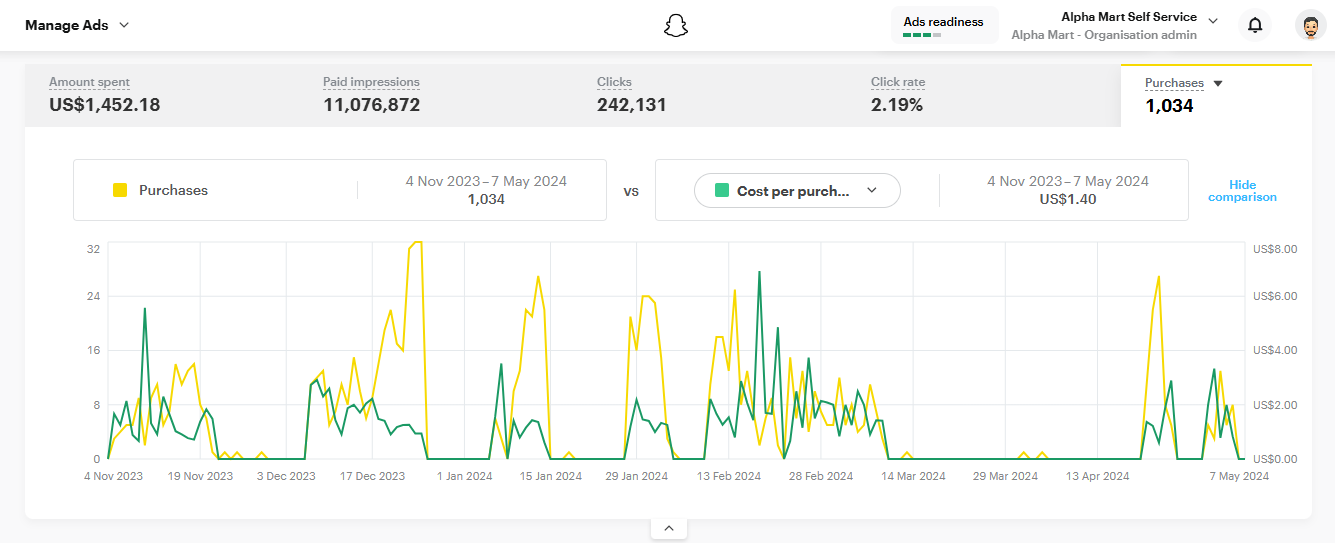
The reason 1,034 purchases matter for this article isn't the ROAS. It's that a store sending a clean, correctly-named, properly-deduplicated PURCHASE event at that volume gives you a reliable baseline for what "working" looks like — and makes it obvious when something has stopped.
What I can't tell you
Two honest limitations, because an article that admits none is usually hiding some.
I can't give you a frequency ranking from a large sample. The order above reflects a small number of accounts plus what the failure modes logically imply — a lowercase event name breaks reporting deterministically, so it belongs at the top regardless of how often I have personally seen it. Treat the ranking as a sensible search order, not a statistic.
Snapchat's interface changes. Menu paths go stale quickly, which is why the checks above are anchored to the network request and the payload rather than to where a button currently sits. The payload is the thing that's actually true.
The short version
- Open the Network tab, filter
tr.snapchat.com, place a test order. - Confirm the event name is exactly
PURCHASE, uppercase. - Confirm
transaction_idis present and unique per order. - Confirm the pixel exists on the page the customer actually lands on.
- If checkout leaves your domain, plan for the Conversions API.
- If you run pixel and CAPI, confirm the dedup identifier matches exactly on both sides.
If you get through all six and the event still doesn't arrive, the problem is usually not the pixel — it's that the page you're testing isn't the page your customers reach. Go back and complete a real purchase with real money, on a phone, from an ad click. Test orders through a staging link skip precisely the parts that break.
Not sure which of the six it is?
Send me your store URL and I'll tell you what your tracking is doing. No account access needed to start — just the link.
Get a free tracking audit →